
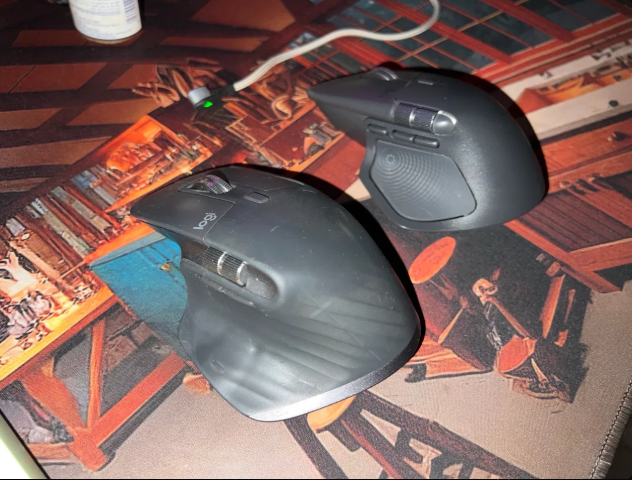
MX Master 3 vs MX Master 4: my wife took the new one, and I’m fine with that
Logitech has just launched a special Developer Edition of its MX Master 4 mouse, with a code-themed finish and, in China, a bundled AI plugin. It is a good moment to ask a simpler question: if you already own an MX Master, do you need the new one?
I have both in my house. I use the MX Master 3. My wife uses the MX Master 4, because she bullied me into handing it over on the grounds that wives get the newer gadget. That has given me plenty of time to compare them.
Why the MX Master gets you hooked
Once you have used an MX Master, it is hard to go back to anything else. For both of us, four things did it:
- The side scroll wheel. A thumb wheel for scrolling sideways through spreadsheets, timelines and wide documents.
- The MagSpeed wheel. It switches between precise click-by-click scrolling and a free spin that flies through long pages.
- Precision. Tracking is accurate and smooth, even on detailed work.
- Battery life. I charge mine roughly every 4 weeks. Logitech rates the MX Master 4 at up to 70 days on a full charge.
What the MX Master 4 changes
On paper, the 4 brings a lot:
- A haptic panel under your thumb that buzzes gently when you pair devices, switch computers or run low on battery. Pressing it opens the Actions Ring, a pop-up menu of shortcuts.
- An 8,000 DPI sensor (dots per inch), up from 4,000 on the original MX Master 3.
- Quieter clicks, slightly larger main buttons and a gesture button moved in front of the side buttons.
- Less rubber on top and more textured plastic, which should age better.
- A little heavier, at 150g against 141g for the MX Master 3.
What it feels like in real life
Honestly, not much different. A few buttons have moved, but both still feel like an MX Master: the same shape in the hand, the same wheels, the same precision. My wife is happy with the 4, and I have not once felt I was missing out with the 3.

The Developer Edition
The new edition does not change the hardware. It is the same MX Master 4 with a developer-themed design. Its “AI support” is a Logi Options+ plugin that links the mouse’s shortcuts to Tencent’s WorkBuddy assistant, for tasks such as meeting summaries and translation. For now that bundle is aimed at China.
Will I upgrade? Yes. The hard part is getting one to Ghana. Amazon does ship here, but the shipping fees are hefty, and that adds a lot to a $120 mouse. I wish Amazon would make it cheaper to ship to Ghana.
Should you upgrade?
- You own an MX Master 3 or 3S: keep it. The 4 is better on paper, but day to day it feels much the same.
- You use a basic mouse: any MX Master is a big step up, and the 4 is the one to buy new.
- In Ghana: I bought mine on Amazon and had them shipped here. Locally, the MX Master 3S is easier to find than the 4: when I checked on 2 November, Jumia Ghana listed the 3S at GH₵2,499 and Shopwice listed the Mac version at GH₵2,400. I could not find the MX Master 4 at a major Ghanaian retailer yet; Logitech sells it for $119.99 in the US. If you order from abroad, budget for shipping and import duty, and check what warranty the seller offers.
The bottom line
The MX Master 4 is a refinement, not a revolution. The best thing about it is that it is still an MX Master.
Sources: Notebookcheck, 1 November; Engadget; RTINGS; Logitech MX Master 3 specifications; Logitech US store; Jumia Ghana and Shopwice, prices checked 2 November.
Top photo: The MX Master 3 (front) and MX Master 4 (back). Photo: Fifty4 News